 Diskfern
Choose by workflow
Which Mac storage tool fits your work?
A built-in overview, a disk map, a maintenance suite and a recovery app serve different needs.
Fact-checked:
About this comparison
This comparison is published by Diskfern. Competitor information is based on publicly available vendor websites and documentation and was checked on the date shown. We highlight where each product may be a better fit rather than naming a universal winner.
Diskfern is not affiliated with, sponsored by, or endorsed by the products or companies mentioned on this page. Product names and trademarks belong to their respective owners.
Apple, Mac and macOS are trademarks of Apple Inc. Diskfern is an independent product and is not affiliated with or endorsed by Apple Inc.
How to read the evidence
Competitor details come from vendor documentation; Diskfern details come from our product information. Recommendations interpret those workflows. We did not run head-to-head tests or independently audit privacy or safety. A feature we could not verify is marked as not documented, which does not mean it is absent. Pricing and requirements can change.
Diskfern is coming soon. Explore its features and pricing before deciding which workflow fits your Mac.
pricingrequirementsDisk Advisor · On-device AI
Understand a file before you remove it.
Diskfern can explain what a file is, why it’s taking space, and whether it’s safe to remove. Your questions and answers stay on your Mac.
Requires macOS 26+ and an eligible Mac with Apple Intelligence enabled and its model ready. Core storage analysis works without it.
AI answers can be wrong or unavailable. Use them as guidance and review the file before removing it.
requirementslocal analysisperformance and availability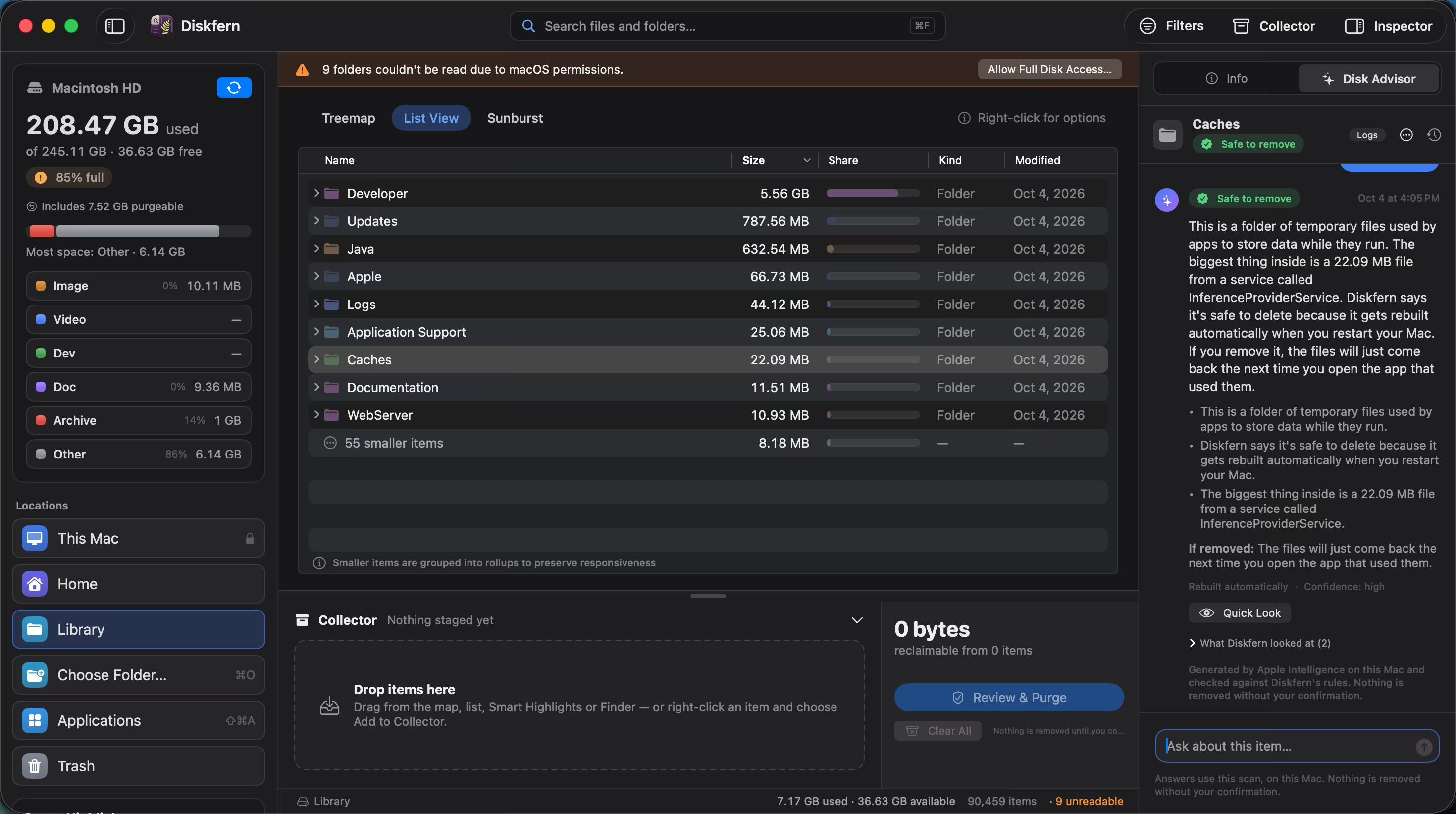
Seven Mac storage options
Best disk space analyzers for Mac: choose by workflow
Choose by the job: visual exploration, a largest-first list, built-in management, a maintenance suite or data recovery.
Read comparisonDaisyDisk
Diskfern vs DaisyDisk
Choose DaisyDisk if you prefer sunburst navigation, need its documented cloud integrations, or want a one-time personal license.
Read comparisonCleanMyMac
Diskfern vs CleanMyMac
Choose CleanMyMac if you want cleanup, malware tools, maintenance and app management in one suite.
Read comparisonGrandPerspective
Diskfern vs GrandPerspective
Choose GrandPerspective if you want a free open-source treemap with configurable colors and advanced filters.
Read comparisonOmniDiskSweeper
Diskfern vs OmniDiskSweeper
Choose OmniDiskSweeper if you want a free largest-first browser with direct Open and Trash actions.
Read comparisonmacOS Storage settings
Diskfern vs macOS Storage settings
Choose macOS Storage settings if you need a quick included overview, large-document review or Apple's optimization recommendations.
Read comparisonDisk Drill
Diskfern vs Disk Drill
Choose Disk Drill if recovery is your main requirement, or you want its documented free duplicate and cleanup extras.
Read comparisonSources and evidence
Vendor pages establish documented behavior, not independent performance or safety results. Diskfern links explain product behavior and availability. Each record below states the claim it supports and when it was reviewed.
Browse sources and checked dates
- Diskfern storage views
Treemap, list and sunburst views, name search, Quick Look and read-only scans.
Diskfern · Checked
- Diskfern cleanup workflow
Collector review; Trash by default with a preference override; an explicit permanent mode; authentication and protected-path checks.
Diskfern · Checked
- Diskfern developer categories
Named developer-storage categories and safety labels.
Diskfern · Checked
- Diskfern requirements
Core analysis requires macOS 14+ on Intel or Apple silicon. Disk Advisor requires macOS 26+ and an eligible Mac with Apple Intelligence available.
Diskfern · Checked
- Diskfern performance and availability
Measured scan, classification and search timings. Results vary by system; Disk Advisor response time and availability can vary. Duplicate matching is not currently available.
Diskfern · Checked
- Diskfern local analysis
Scanning and Disk Advisor run on your Mac.
Diskfern · Checked
- Diskfern pricing
Free analysis and paid cleanup tiers. Diskfern is coming soon.
Diskfern · Checked
- DaisyDisk US App Store pricing
US marketplace edition: USD $9.99. Marketplace licensing differs from the standalone personal license; regional prices and taxes vary.
Software Ambience · Checked
- GrandPerspective US App Store pricing
US marketplace edition: USD $2.99. The standalone download is free; regional prices and marketplace license terms vary.
GrandPerspective · Checked
- DaisyDisk product and license
One-time personal license, up to five personal Macs, minor updates; sunburst and optional cloud scans.
Software Ambience · Checked
- DaisyDisk technical specifications
macOS 10.13+, Intel and Apple silicon; Quick Look; system-file safeguards; local scan metadata privacy.
Software Ambience · Checked
- DaisyDisk deletion guide
Collector staging, five-second cancellation, permanent deletion bypassing Trash and protected folder exclusions.
Software Ambience · Checked
- DaisyDisk trial guide
Standalone trial with locked features and activation; App Store edition does not offer a trial.
Software Ambience · Checked
- CleanMyMac product
Maintenance suite: cleanup, malware, app management and duplicates.
MacPaw · Checked
- CleanMyMac store
Regional pricing, monthly/annual/one-time options and device-count choices. Promotional and renewal amounts can differ; see current vendor pricing.
MacPaw · Checked
- CleanMyMac purchase options
Subscription and one-time retail licenses; marketplace differences; major-version upgrade limits.
MacPaw · Checked
- CleanMyMac installation and trial
Seven-day retail full trial and account activation.
MacPaw · Checked
- CleanMyMac supported macOS versions
Current CleanMyMac requires macOS 11 or newer; individual features may require later versions.
MacPaw · Checked
- CleanMyMac Moonlock Engine
Vendor describes operation on Intel and M-series Macs; does not establish identical feature availability.
MacPaw · Checked
- CleanMyMac Space Lens
Bubble storage map and folder/disk scanning.
MacPaw · Checked
- CleanMyMac Space Lens review
Review and Remove list, deselecting and Finder paths; article does not establish Trash behavior.
MacPaw · Checked
- CleanMyMac large and old files
My Clutter size/access grouping, name search and Quick Look; this tool's deletion bypasses Trash.
MacPaw · Checked
- CleanMyMac tools
App Uninstaller, updater and malware/privacy tools.
MacPaw · Checked
- MacPaw CleanMyMac CLI
Separate public-beta CLI documents developer-cache cleanup; not proof all these categories exist in desktop app.
MacPaw · Checked
- CleanMyMac privacy notice
Account, device and usage data processing; mentions Apple Intelligence integrations, without establishing a storage-chat equivalent.
MacPaw · Checked
- GrandPerspective features
Free open-source download, project-listed $2.99 App Store edition; treemap, name search, advanced filters, Quick Look, navigation and deletion. Latest product requirements: macOS 14+, Intel and Apple silicon.
GrandPerspective · Checked
- GrandPerspective 3.8.1 release
Current product requirements list macOS 14+, Intel and Apple silicon. The 3.8.1 release notes give a conflicting macOS 11+ minimum; confirm older-system compatibility with the vendor.
GrandPerspective · Checked
- GrandPerspective deletion preferences
Configurable deletion/confirmation; folder Trash action includes filtered or unscanned contents.
GrandPerspective · Checked
- OmniDiskSweeper product
Largest-first file browsing with Open or Trash; legacy downloads listed separately.
The Omni Group · Checked
- OmniDiskSweeper announcements
Vendor describes OmniDiskSweeper as free.
The Omni Group · Checked
- Omni 2026 compatibility
Vendor tested OmniDiskSweeper on macOS 26; source does not establish current minimum OS or CPU architecture.
The Omni Group · Checked
- Omni privacy statement
General vendor policy; not evidence of app-specific telemetry-free operation.
The Omni Group · Checked
- Apple: free up storage
Built-in storage categories and recommendations; System Settings location on macOS 13+; optional iCloud storage.
Apple · Checked
- Apple: find and delete files
Category management, large files, downloads, folder browser and app deletion; System Data managed by macOS.
Apple · Checked
- Apple: optimize storage
Storage optimization and optional cloud recommendations, distinct from a recursive whole-disk map.
Apple · Checked
- Disk Drill product
Data recovery is primary; documents Intel and Apple silicon, protection and extra tools.
CleverFiles · Checked
- Disk Drill Mac download
Current Mac download advertises macOS 10.15–26.x.
CleverFiles · Checked
- Disk Drill requirements
Disk Drill 6 lists Catalina and newer, but Catalina patch entry conflicts with normal version numbering; confirm exact patch with vendor.
CleverFiles · Checked
- Disk Drill PRO licenses
One-year subscription and lifetime recovery options; one user and three devices; regional prices available from the vendor.
CleverFiles · Checked
- CleverFiles privacy policy
Policy applies to the website and products and describes information processing; reviewed text does not establish cleanup-specific network behavior or a no-telemetry guarantee.
CleverFiles · Checked
- Disk Drill cleanup guide
Free cleanup; largest-first list with bars, keyword/size/type filters, file preview, Trash or permanent deletion and protected-location warnings. Guide published in 2021; current controls may differ.
CleverFiles · Checked
- Disk Drill duplicate guide
Duplicate scanning and selection/removal warnings. Guide published in 2021; current controls may differ.
CleverFiles · Checked
About this comparison
Diskfern is not affiliated with, sponsored by, or endorsed by the products or companies mentioned on this page. Product names and trademarks belong to their respective owners.
Apple, Mac and macOS are trademarks of Apple Inc. Diskfern is an independent product and is not affiliated with or endorsed by Apple Inc.